How to Bulk Import License Keys from a TXT File
Prepare a one-key-per-line file from supplier stock, remove CSV headers and reconcile new and duplicate keys in Kamai.

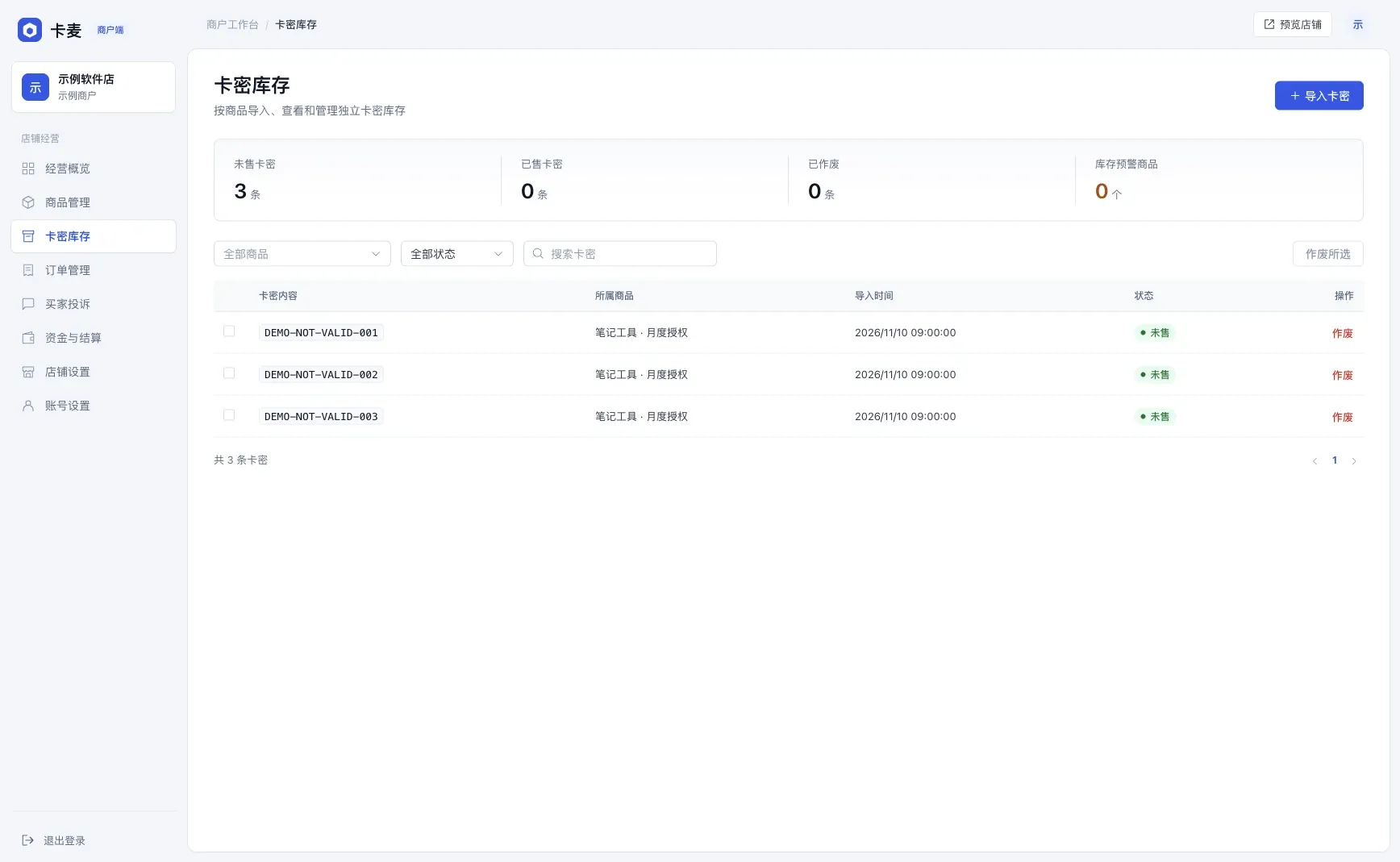
Choose a product under Code inventory (卡密库存). Paste one code per line or upload a UTF-8 TXT file. If your supplier sends a spreadsheet or CSV, select the column that contains the actual keys and export just those values. A header, comma-separated price or surrounding quotes would become part of the delivered text.
DEMO-NOT-VALID-001
DEMO-NOT-VALID-002
DEMO-NOT-VALID-003
With an empty stock pool, these three sample lines should produce three additions. Importing the same batch again should report duplicates. Check the selected product and the available count before selling.
1. One product, one inventory
Give every product its own code inventory and never mix them. This is the most important habit of all.
Many merchants sell several editions of the same software, or several denominations of the same redeem code. If they share one inventory, the system cannot tell which code belongs to which edition, and a buyer of the personal edition may receive a professional key — or the other way round.
On Kamai, inventory is separated by product by design: every import is tied to a product, and orders only draw codes from that product’s inventory. So the right approach is to create a separate product for every edition, denomination and license term, with the difference stated in the title. As a bonus, reconciliation becomes trivial: you can see at a glance how many of each product were sold and how many remain.
If you sell software keys, see the setup advice in sell software license keys online.
2. Check the format before importing
A minute spent checking a file before a bulk import is far cheaper than handling a complaint afterwards. Look for three things:
- One code per line. Each line holds one complete code — do not split a card number and PIN across two lines or put several codes on one line.
- No stray characters. Remove leading and trailing spaces, tabs and blank lines at the end of the file. Copying from spreadsheets is a common source of these.
- No previously sold codes. Make sure every code in the batch is unsold.
Kamai accepts pasted codes or a TXT upload, up to 1,000 codes and 1 MB per import. Codes that exactly match ones already imported are skipped, and when the import finishes you see how many were added and how many were skipped. If the number added is not what you expected, stop and find out why — it is often the first sign of a problem batch.
If you discover bad codes after importing, you can void the unsold ones in inventory and they will never be delivered. Delivered codes cannot be voided, which is why checks belong before the import.
3. Keep an eye on stock levels
When inventory runs out, buyers can no longer place orders. For an auto-delivery store, running out of stock is the quietest kind of loss: nobody tells you they wanted to buy but could not.
Some practical tips:
- Check low-stock alerts regularly. The merchant dashboard lists products running low; make a habit of glancing at it daily.
- Restock before busy periods. Stock up ahead of holidays, promotions and new releases based on expected sales.
- Understand reserved codes. When a buyer places an order, the system reserves codes for it for 15 minutes, shown as reserved by pending payment. They are not sold yet, but cannot be sold to anyone else either, and are released automatically if the order is not paid. Factor them in when restocking.
To see why reservation prevents overselling, read automatic digital delivery.
4. Write clear redemption instructions
Explain how to redeem the code and anything to watch out for in the product description. Letting buyers redeem on their own is the most effective way to cut down on questions.
Good instructions usually cover:
- Where to redeem — the redemption page or the exact activation steps;
- Restrictions — supported regions, operating systems, number of devices, expiry date;
- Common questions — for example “it says the code was already used” or “where do I find it after redeeming”;
- After-sales — file an order complaint if something goes wrong, and what information to include.
Putting instructions up front also helps when a buyer cannot use a code because they ignored a restriction the description already stated: you have a clear basis for handling the case. See the refund policy.
A weekly checklist
To turn these habits into routine, spend ten minutes each week on this list:
- Have all low-stock products been restocked, or confirmed as discontinued?
- Did this week’s imports add the number of codes you expected?
- Are there expired or invalid unsold codes that should be voided?
- Have all of this week’s order complaints been handled and recorded?
- Do products with repeated complaints need better instructions?
- Do upcoming holidays or promotions call for extra stock?
If one product keeps getting the same kind of complaint — say, “region not supported” — the problem is rarely the buyer. Usually the instructions are unclear or the batch itself is faulty. Fixing the description or changing suppliers beats handling complaints one by one.
Summary
| Habit | Problem it prevents |
|---|---|
| Separate inventories | Mixed editions, messy reconciliation |
| Pre-import checks | Format errors, codes sold twice |
| Watching stock | Silent losses from running out |
| Clear instructions | Repeated questions, after-sales disputes |
With your inventory in order, automatic delivery becomes truly automatic. If you have not chosen your store layout yet, read product cards or compact list? next.
Frequently asked questions
Can I upload a multicolumn CSV?
Export only the key column as plain text, one key per line, with no header.