
Automatic digital delivery: paid, then delivered in seconds
Kamai delivers digital codes automatically: codes are reserved at checkout and shown the moment payment succeeds, 24/7, with no merchant online.
Automatic digital delivery means that when a buyer’s payment succeeds, the system takes a code from that product’s inventory and hands it to the buyer — no merchant online, no manual checking. For merchants selling license keys, redeem codes or e-book access codes, an order placed at 3 a.m. is fulfilled within seconds.
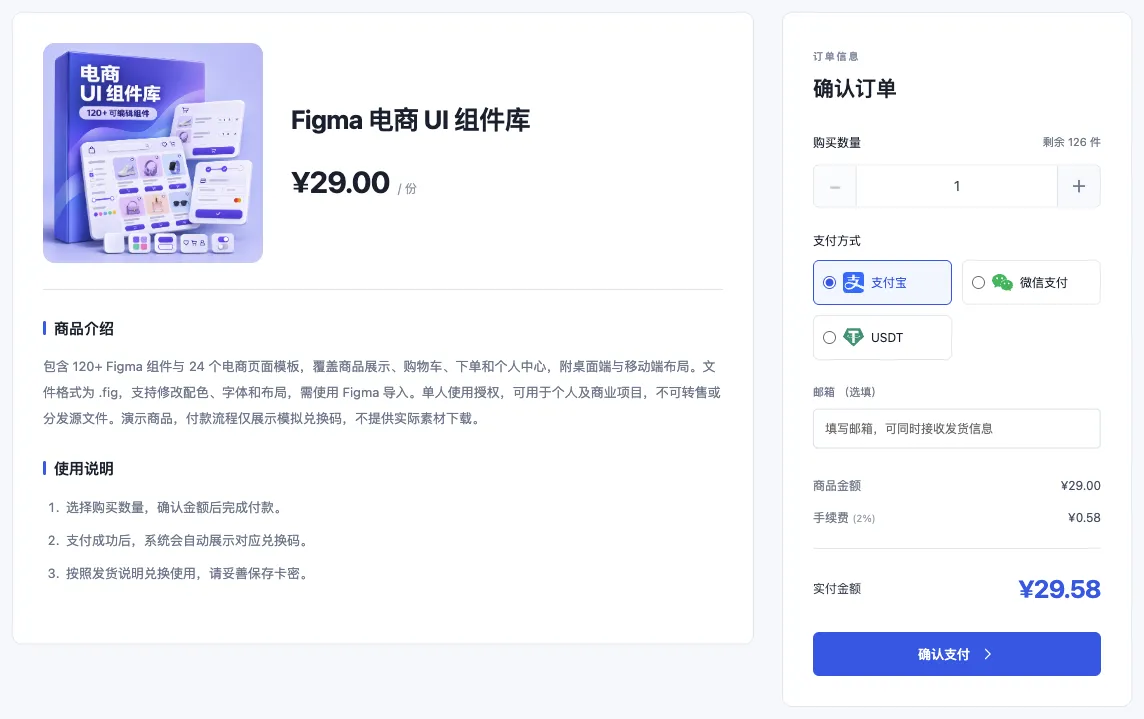
How an order gets delivered automatically
- The buyer orders. They pick a product, quantity and payment method (USDT, Alipay or WeChat Pay), and can optionally add an email address and a lookup password.
- A code is reserved. As soon as the order is created, the system reserves the right number of codes from that product’s inventory, so two orders can never grab the same code.
- Payment within 15 minutes. The order is held for 15 minutes. If it is not paid, it closes automatically and the reserved codes go back on sale.
- Delivered on payment. Once payment succeeds, the delivery page shows the code with a copy button. Buyers who left an email can also receive a delivery copy.
- Retrievable any time. Buyers can view the code again later in “Order lookup” with the 32-character order number, or their email plus lookup password.
The only thing a merchant needs to do is import codes into inventory in advance.
Why reserve first and take payment second?
Many delivery problems come from concurrency: two buyers order at once, one code is left, and someone pays without getting anything. Kamai locks codes to an order the moment it is created, so any order that can be placed can be fulfilled. Unpaid orders release their codes automatically, so inventory is never stuck. The merchant dashboard also shows codes reserved by pending orders separately.
What merchants prepare
- Import codes per product. Each product has its own inventory. Paste codes one per line or upload a TXT file — up to 1,000 codes and 1 MB per import. Duplicates of existing codes are skipped automatically.
- Write clear instructions. Explain how to redeem, supported regions and caveats in the product description, so buyers can redeem on their own.
- Watch stock levels. Buyers cannot order once stock runs out. The dashboard flags low-stock products; restock before busy periods. See four habits for keeping your code inventory in shape.
What if something goes wrong?
Automatic delivery solves fulfilment, but a code itself can still fail. Buyers can file a complaint with their order number, choosing a type such as “invalid code” or “paid but no code”. The complaint goes straight to the store, which can send a replacement. See the refund policy.
FAQ
Are orders delivered when the merchant is offline? Yes. Delivery is handled entirely by the system, whether or not the merchant is signed in.
What if the buyer did not leave an email? The code always stays on the delivery page, and the buyer can look it up again with the order number. Buyers should still copy and save it promptly.
Can buyers purchase several codes at once? Yes. The buyer chooses a quantity and receives that many codes in one delivery.
When can merchants withdraw? Kamai assesses the merchant’s business category to determine the settlement cycle (T0, T1 or T7). After delivery, proceeds become available according to that cycle. See settlement and withdrawal rules.